
How Lucive Secures Your Data
Your journal entries are deeply personal. Lucive is designed from the ground up to ensure that only you can read them. Not us, not anyone else.
The Short Version
- Your data is encrypted on your device before it ever leaves
- We can't read your entries, even if we wanted to
- No cloud storage. Your journal lives on your devices
- Sync is end-to-end encrypted. We're just a mailbox passing sealed envelopes
How Your Data is Protected
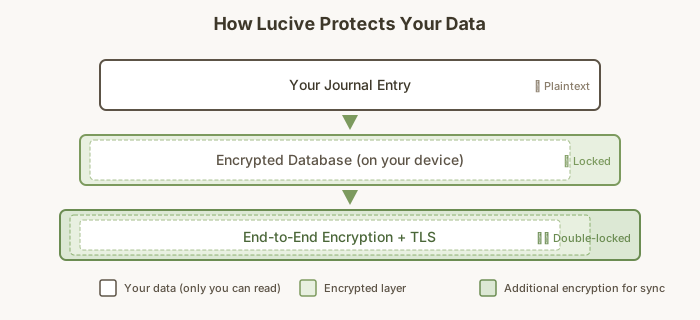
On Your Device
Your journal entries are stored securely on your Mac, iPhone, or other device:
Desktop (macOS): Your database is encrypted using SQLCipher with AES-256 encryption. The encryption key is stored in the macOS Keychain, the same secure vault that protects your passwords. Even if someone copied your database file, they couldn't read it without the key.
Mobile (iOS): Your journal database is protected by iOS's built-in security: the app sandbox prevents other apps from accessing your data, and iOS Data Protection encrypts your files when your device is locked. Your sync encryption keys are stored separately in the iOS Keychain, which can use Secure Enclave hardware protection when available.
During Sync
When you sync entries between your phone and computer, they travel through our relay server. But here's the important part: we designed the system so our servers cannot decrypt your data.
Your devices share an encryption key directly via QR code during pairing. This key is never transmitted over the internet. Our relay server only sees encrypted data that looks like random noise.
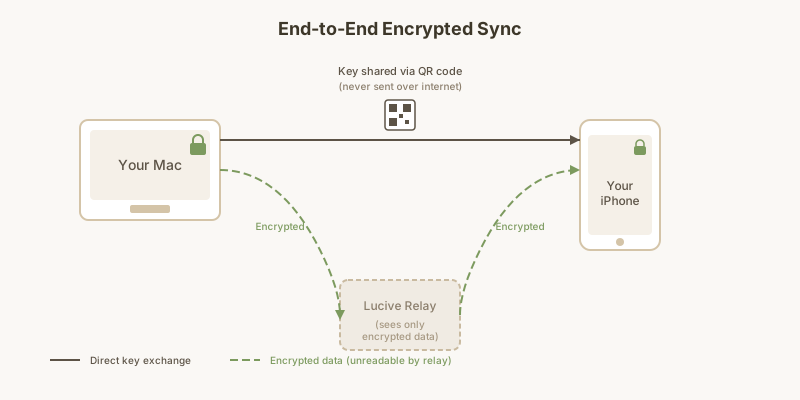
Think of it like sending a letter in a locked box: the postal service can deliver the box, but they can't open it. Only you have the key.
Device Pairing
When you pair your phone with your computer:
- Your desktop generates a secure encryption key
- This key is displayed as a QR code on your screen
- Your phone scans the QR code, receiving the key directly
- The key never travels over the internet
This "out-of-band" key exchange means even if someone intercepted all network traffic, they couldn't decrypt your data. They never had the key to begin with.
What We Can See vs. What We Can't
| We CAN See | We CANNOT See |
|---|---|
| That your devices are connected | Your journal entries |
| When sync happens | Entry titles or content |
| Encrypted data (looks like random bytes) | Journal names |
| Any personal information |
Emergency Recovery
When you set up Lucive, you receive a 6-word recovery phrase. Keep this somewhere safe. It's your backup if you ever lose access to all your devices.
Your recovery phrase is derived from your master encryption key using a standard word list. It can restore your full journal data, including all entries and journals, to a new device. Without this phrase (and without at least one paired device), your data cannot be recovered. We don't have a copy, and we can't reset it for you. This is by design: it means no one, including us, can access your journal without your permission.
Important: Write your recovery phrase on paper and store it securely. If you lose all your devices and don't have the phrase, your journal entries are unrecoverable.
Technical Details
For those interested in the specifics:
- Encryption: XSalsa20-Poly1305 authenticated encryption (256-bit keys)
- Key Sharing: Out-of-band via QR code (key never transmitted over network)
- Password Hashing: Argon2id (memory-hard, resistant to GPU attacks)
- Random Numbers: OS-provided cryptographic random number generators
- Library: libsodium, a widely-audited cryptographic library
These are industry-standard algorithms used by security-focused applications worldwide.
Unlocking and Authentication
You can optionally set a password to protect your journal. This adds an extra layer of security on top of your device's built-in protections.
Desktop: If you choose to set a password, it is processed using Argon2id, a memory-hard algorithm that makes brute-force attacks impractical. After several incorrect attempts, Lucive introduces delays to further slow down guessing.
Mobile: In addition to an optional password, you can enable Face ID or Touch ID for convenient unlocking. Your biometric data never leaves your device; iOS handles authentication locally and simply tells Lucive "yes" or "no."
When You Delete an Entry
When you delete a journal entry, it's removed from your local database immediately. If you have sync enabled, a deletion record is sent to your other devices so they remove it too.
Our relay server does not store your entries. It only passes encrypted messages between your devices in real time. Once delivered, messages are discarded. There is no server-side archive of your data, encrypted or otherwise.
About Our Relay Server
The relay server exists only to connect your devices. It runs on infrastructure hosted in the United States and handles the encrypted sync traffic between your phone and computer.
What the relay server does:
- Maintains WebSocket connections to your devices
- Passes encrypted messages between them
- Logs connection events for debugging (device IDs, timestamps, not content)
What the relay server does not do:
- Store your journal entries
- Decrypt any data (it cannot; it doesn't have your keys)
- Retain messages after delivery
We do not currently offer self-hosting, but the relay sees only encrypted data regardless of who operates it.
Optional: MCP and AI agents
Lucive ships with an optional server that speaks the Model Context Protocol (MCP), the open standard Claude Desktop, Codex, and other agents use to call local tools. With it on, an agent running on the same machine can search and edit your journal in the same ways you can.
What stays the same. The MCP server runs as a separate process on your machine and talks to the live Lucive app over stdio. Lucive itself doesn't add a relay or a cloud database. The encrypted SQLite file is never read directly by an agent. Everything an agent sees, you've already decrypted to read on screen.
What changes when MCP is on. Once the assistant has read an entry, that text is part of your chat with it. It then travels to that assistant's model provider (Anthropic, OpenAI, whoever's on the other end) the same way anything else you type to the assistant does. Their terms of service and data-handling policies apply from that point on, not ours. You're extending trust to that provider for the contents of any entry the assistant touches.
That tradeoff is why MCP is off by default. Turn it on if the capability is worth the trust you're extending. Turn it off (or leave it off) if it isn't. Full instructions, including how to disconnect, are in the MCP documentation.
Data Export
You can export your journal at any time from Settings. Exports are saved as a ZIP archive containing Markdown files, one per entry, with YAML frontmatter for metadata. These files are readable by any text editor and compatible with other note-taking applications like Obsidian.
Device Security
Lucive's encryption protects your data at rest and in transit. However, encryption assumes your device itself is secure.
If your Mac or iPhone is compromised by malware, an attacker with access to your running device could potentially read decrypted data in memory. This is true of any application. To protect yourself:
- Keep your operating system updated
- Use a strong device passcode
- Enable FileVault (Mac) or device encryption (iOS enables this by default)
- Be cautious about what software you install
Lucive protects your journal from external access and from us. Protecting your device is your responsibility.
Our Commitment
We built Lucive because we wanted a journal we could trust with our own thoughts. That means:
- No analytics on your content. We don't scan or analyze what you write
- No ads. Your data isn't a product
- No cloud lock-in. Export your entries anytime
- Transparent design. Our cryptographic approach uses well-known, audited libraries. While Lucive is not open source, we're happy to discuss our security architecture with anyone who asks
Your journal is yours. We just build the tools to keep it that way.
Questions?
If you have questions about our security approach, email us at support@lucive.app.